If you spend hours online each day, a VPN can be a practical privacy tool—but only when you understand what it protects, what it doesn’t, and what trade-offs you’re accepting.
This guide explains VPN benefits in plain English, shows common failure scenarios, and gives you a quick decision framework so you can choose (or skip) a VPN confidently.
Quick take: do you need a VPN?
- Usually yes if you travel, use public Wi-Fi, or work from cafés and hotels.
- Maybe if you want to reduce IP-based tracking and location mismatch issues (but you’ll still need browser privacy basics).
- Not required if your main goal is “total anonymity” or “being untraceable” (a VPN is not built for that).
If you’re setting this up on streaming hardware, follow our VPN on Firestick setup guide for the device-specific steps.
What is a VPN?
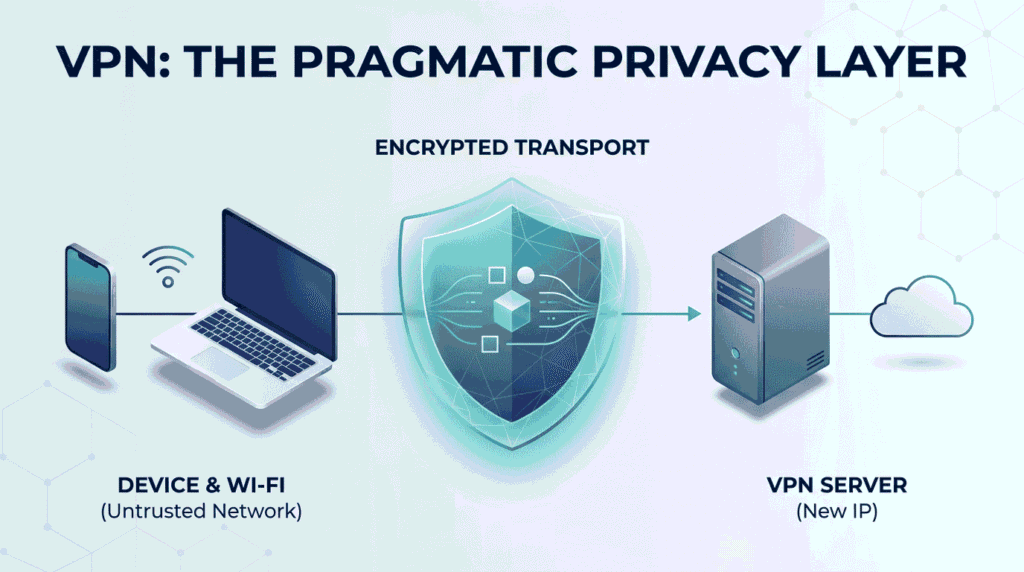
A VPN (Virtual Private Network) creates an encrypted “tunnel” between your device and a VPN server, which then connects to the wider internet on your behalf. A clear, non-marketing explanation is Cloudflare’s VPN overview of how the tunnel works.
In practical terms, this usually changes what IP address websites see (they see the VPN server’s IP, not your home IP) and it encrypts traffic between you and the VPN server—useful on untrusted networks and in some privacy scenarios.
Important boundary: the VPN tunnel protects the connection up to the VPN server, not magically across the whole internet. For the deeper security framing behind “tunnels” and what they protect, see Cloudflare’s plain-language tunneling explanation.
Why you might want a VPN
1) Safer browsing on public Wi-Fi
Public Wi-Fi is convenient, but it’s a common place for account theft and “network snooping” to happen if you log in carelessly. The U.S. FTC explains what changed over time (more encryption on the web) and what you should still do today in its public Wi‑Fi safety guidance.
Practical workflow: use a VPN on public Wi-Fi, avoid logging into sensitive accounts if anything looks “off,” and confirm you’re on encrypted (https) pages before entering passwords.
2) Privacy against local network observers
A VPN can prevent intermediaries between you and the VPN server from reading your traffic in transit. That’s a meaningful upgrade when you don’t fully trust the network you’re on (public hotspots, shared housing Wi-Fi, travel networks).
Reality check: you’re shifting trust from the Wi-Fi operator/ISP to the VPN provider, so the provider you choose matters as much as the technology.
3) Fewer IP-based blocks and location mismatches
Some services treat “where you are” as a signal (fraud prevention, content licensing, suspicious logins). Because a VPN can change the IP address that a site sees, it sometimes reduces friction when you’re traveling—or it can create friction if the VPN location looks unusual.
4) A cleaner remote-access posture (work and admin use)
VPNs are widely used for remote access because tunnels can protect confidentiality and integrity in transit between a device and a gateway. If you want the security-minded view of what a VPN tunnel does (and doesn’t do), NIST’s Guide to Enterprise Telework and Remote Access Security is a solid reference.
If you’re doing any kind of server, router, or NAS admin, also read our public Wi‑Fi safety checklist for admins to avoid the easy mistakes.
When a VPN is not the right tool
- A VPN does not make illegal streaming or downloading “legal.” If content is copyrighted, you still need permission or a licensed source.
- A VPN won’t protect you from phishing, malware, or handing your password to a fake site.
- A VPN won’t stop tracking if you’re logged into the same accounts everywhere and your browser is wide open to fingerprinting.
If your primary goal is privacy, pair a VPN with basic browser hygiene (cookie controls, tracker blocking, and separate profiles). Our VPN buying checklist covers the non-obvious settings that matter.
Light comparison: VPN vs “just HTTPS” vs private browsing
- VPN: Encrypts traffic between you and the VPN server; can change the IP address websites see.
- HTTPS: Encrypts your connection to a website (still essential, with or without a VPN).
- Private/Incognito mode: Mostly limits what is saved on your device; it doesn’t hide you from networks or websites.
If you want to understand protocol choices without brand hype, start with the official WireGuard overview: WireGuard’s protocol page. For a more detailed breakdown, see our WireGuard vs OpenVPN explainer.
How to choose a VPN (practitioner checklist)
- Trust & transparency: Clear ownership, clear policies, and plain-language privacy statements you can actually read.
- Modern protocols: Look for WireGuard (and/or well-maintained OpenVPN support).
- Kill switch: Prevents accidental “leaks” if the VPN drops.
- DNS behavior: Prefer providers that route DNS safely (and don’t quietly switch you to logging resolvers).
- App quality: Stable clients on your actual devices (Windows/macOS, Android/iOS, Fire TV, router support if needed).
Troubleshooting: common VPN issues
- Streaming or sites break: Try a different server region; disable ad blockers temporarily to test; confirm the site works without VPN.
- Slow speeds: Use a closer server; switch protocols (if available); avoid peak-time servers.
- Captchas everywhere: Some VPN IPs are “high risk” due to abuse; switch servers or providers.
- Random disconnects: Enable kill switch; update the app; test a different protocol.
For step-by-step fixes (including Firestick-specific problems), use our VPN troubleshooting guide.
FAQ
Does a VPN make me anonymous?
No—think of a VPN as “encrypted transport + IP address substitution,” not a magic invisibility cloak.
Will a VPN protect my passwords on public Wi‑Fi?
It helps by encrypting your traffic to the VPN server, but you should still only enter passwords on encrypted (https) pages.
Can my ISP see what I do if I use a VPN?
A VPN is designed so intermediaries can’t read the traffic inside the tunnel, but your privacy still depends on the VPN provider and the security of the sites you use.
Is it worth paying for a VPN?
If you regularly use public Wi‑Fi or you want a consistent privacy layer across devices, paid options are often more predictable than free apps—but you should still evaluate trust, policies, and app behavior.
Should I keep my VPN on all the time?
It depends. Always-on VPN can be convenient, but it can also trigger account security checks and occasional site breakage. Many people use it selectively (public Wi‑Fi, travel, admin tasks).
What’s the best VPN for beginners?
The best choice is usually the one with trustworthy policies, stable apps on your devices, and modern protocol support—not the one with the loudest marketing.
Final note
A VPN is most useful when you treat it as one layer in a larger safety setup. If you want, share what devices you use (phone, laptop, Firestick, router) and what your main goal is, and we can map the simplest setup that fits.

💬 Comments