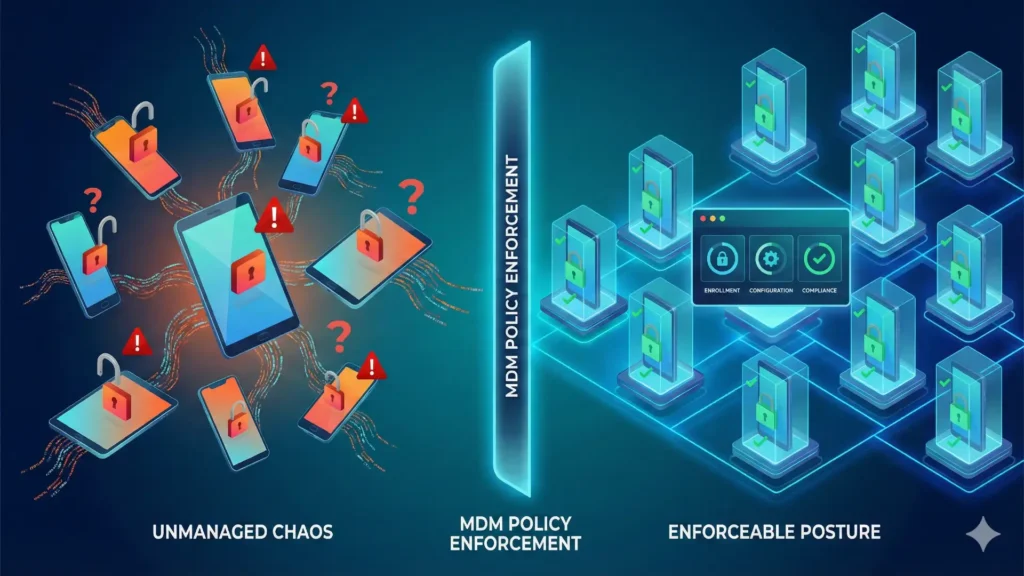
Mobile Device Management (MDM) is one of the highest-leverage controls you can deploy for mobile security because it turns ad-hoc, user-driven settings into enforceable policy.
But MDM is not a force field: it reduces risk and blast radius, and it works best when paired with identity controls, secure access, patching discipline, and user education.
Quick take (30 seconds)
- MDM is about enforceable configuration: passcodes, encryption expectations, app and network restrictions, and remote actions (lock/wipe) at scale.
- Most real mobile “breaches” are identity-led (phishing/credential theft) or configuration-led (unpatched devices, unmanaged apps, data sync to personal cloud).
- If you can’t describe your mobile fleet by ownership model (BYOD vs COPE vs fully managed), you’re not managing risk—you’re guessing.
The dominant breach pattern (what IT sees first)
In practice, mobile incidents usually start with one of four triggers: a user is tricked into giving up credentials, a device is lost/stolen, an unmanaged or misconfigured device connects to corporate resources, or a risky app/profile/certificate changes the trust model on the phone.
This is why endpoint management matters on mobile: unlike laptops, phones roam constantly, use multiple wireless interfaces, and carry sensitive data in always-on workflows (mail, chat, files, camera).
What this means for security leaders
Stop treating mobile as a “smaller desktop.”
Treat it as a portable identity-and-data processing platform that needs a lifecycle: select → enroll → configure → monitor → respond → retire.
What MDM actually is (plain English)
On modern platforms, MDM is a built-in management framework that allows an organisation to securely configure devices using profiles/commands, check compliance, and take remote actions like locking or wiping.
In most environments, MDM sits inside a broader enterprise mobility stack that may also include app management, threat defense, and app vetting—because policy without monitoring and response is brittle.
MDM’s real value: risk reduction mechanics
1) Standardising security posture (before the first login)
MDM matters most at day 0: the moment a device is allowed to touch corporate email, files, or single sign-on.
A managed baseline typically includes enforced screen lock requirements, reduced risky features, and controls that detect drift from the approved configuration.
Implementation note: If you’re already in the Microsoft ecosystem, map your Android plan to Microsoft Intune’s corporate-owned work profile enrollment guidance so you’re not inventing enrollment flows from scratch.
2) Making ownership models explicit (BYOD vs COPE vs fully managed)
Manage mobile is meaningless unless you specify device ownership and user expectations.
For Android, start with Google’s definition of a fully managed device for company-owned endpoints and decide where you need device-wide controls versus work-only controls.
Practitioner rule: If a role handles sensitive data and spends time off-network (travel, field work), default to COPE or fully managed unless there’s a strong business reason not to.
3) Remote actions that limit damage (lock, selective wipe, full wipe)
Remote wipe is useful, but it’s not a silver bullet: devices can be offline, and an attacker can access data before the wipe command is received.
Treat wipe as one layer in a multi-layered approach, not the whole plan.
4) Turning policy into evidence (compliance + auditability)
The moment an incident happens, leadership asks two questions: “Were we enforcing policy?” and “Can we prove it?”
If you operate in the UK (or sell to UK public sector), align your controls with the expectations described in the UK government’s Security Standard for mobile devices (SS-017).
Decision framework: Do you need MDM, MAM, or both?
Use this to avoid over-managing (which triggers shadow IT) or under-managing (which guarantees blind spots).
Start | |-- Are devices company-owned? ---- Yes --> Prefer MDM/EMM baseline + compliance | | | '-- High sensitivity? --> Fully managed / supervised | '-- Devices personally owned (BYOD)? | |-- Do you only need to protect a few corporate apps? --> Consider app-focused management (MAM) + conditional access | '-- Do you need device-wide controls (OS version, encryption, block risky features)? --> You need MDM/EMM (or move to COPE)
Internal reference: If you’re building policy from scratch, start with your BYOD policy template and define where you draw the line between “work container” and “device-wide enforcement.”
When MDM will disappoint you (so plan around it)
- It won’t stop phishing by itself; you still need strong authentication and user training.
- It won’t guarantee malware prevention; it mainly reduces exposure by limiting risky installs, enforcing updates, and enabling response actions.
- It can create employee backlash on BYOD if privacy expectations aren’t explicit—driving shadow IT (personal email, unapproved apps, screenshot workflows).
Internal reference: Pair technical controls with a phishing training playbook that includes mobile-specific lures (SMS, QR codes, app prompts).
Implementation checklist (what good looks like)
Policy + governance – Define ownership models (BYOD / COPE / Fully managed) per role and data sensitivity. – Document what IT can see/do on devices; get acknowledgement.
Technical baseline
-
Enforce screen lock and reduce risky configurations.
-
Define update/patch compliance expectations and actions.
-
Restrict untrusted app installs where feasible; keep an app inventory.
-
Set incident actions: lock, selective wipe, full wipe, and access revocation.
Operations
-
Pilot with tolerant users first, then roll out.
-
Review compliance exceptions monthly; kill “forever exceptions”.
-
Test offboarding: selective wipe and access revocation within hours, not days.
Internal reference: Keep your runbooks operational by maintaining a mobile incident response runbook for lost devices, suspected compromise, and leaver events.
Troubleshooting: common MDM failure modes
Problem: Devices are enrolled but still risky
Check whether you’re enforcing compliance actions (block access, quarantine, require update) or just collecting inventory.
Problem: Users keep bypassing controls
That’s usually a product decision, not a user problem: overly restrictive policy drives workarounds.
Fix it by narrowing controls to the threat model and offering approved alternatives (managed apps, sanctioned file sharing, clearer support).
Problem: Lost device response is slow
Assume remote wipe may not land immediately and design compensating controls: strong authentication, session revocation, and fast identity resets.
FAQ
Is MDM the same as EMM/UEM?
MDM is typically one component inside broader enterprise mobility management suites that can also cover app management and threat defense.
Should we manage BYOD devices the same way as corporate devices?
No—BYOD often benefits from app-focused controls first, because privacy and consent constraints change what you can enforce device-wide.
What’s the fastest win if we’re currently unmanaged?
Pick an ownership model per role, then require enrollment for access to corporate data, starting with email and collaboration apps.
Does MDM solve unpatched phones?
It helps by detecting OS/app versions and applying compliance actions, but patch success still depends on platform support and rollout discipline.
What’s the right default for Android in high-risk roles?
For company-owned devices, fully managed is the model designed for broader enterprise policy control.
Do we still need user education if we have MDM?
Yes—many mobile attacks are social-engineering led, so training remains part of the control set.
Further reading: For a deep, vendor-neutral view of mobile threats and mitigations, use NIST’s mobile device security guideline (SP 800-124r2) as the baseline for policy and lifecycle design.

💬 Comments